You can communicate with multiple recipient groups about a case in the Notes section of the Editing Case screen. This is where all correspondence is recorded between the service location and the customer.
Conversations can take place between the customer and the dealer, internally within the dealer, both at the same time, as well as with contacts outside of those two parties.
To send notes:
- From the Editing Case screen, click Notes.
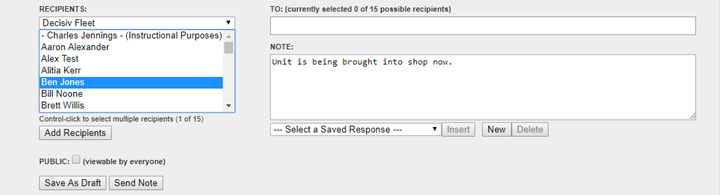
- From the Recipients dropdown, select the correct group of recipients.
To send a note internally to others at your service location, select your location from the list. - Ccroll through the list of recipients, click on the correct one, and click Add Recipients.
You can hold down Ctrl and click multiple recipients and then click Add Recipients to add multiple at the same time. NOTE: You can only add up to 15 recipients to a given note. - Type the message you wish to convey to the customer.
- Click Send Note.
The note will appear within the Previous Notes area along with a time/date stamp and the recipient(s) it was sent to.

NOTE: Internal notes are recognized by the green color shown above and the Internal symbol on the top right of the note.
Comments
0 comments
Article is closed for comments.